Configures anonymous identification for application authorization. This is required to identify entities that are not authenticated when authorization is required.
<anonymousidentification ---enabled="[true false]"
---cookieless="[UseUri UseCookies AutoDetect UseDeviceProfile]"
---cookieName=""
---cookiePath=""
---cookieProtection="[None Validation Encryption All]"
---cookieRequireSSL="[true false]"
---cookieSlidingExpiration="[true false]"
---cookieTimeout="[DD.HH:MM:SS]"
---domain="cookie domain"
/>
This is the link to MSDN for the actual definition of the webconfig setting
Friday, October 27, 2006

ASP.NET 2.0 Profile object from web service
You have started to use ASP.NET 2.0 Profile Provider and you are very happy with it. All your .aspx pages are full of "Profile.Something". You also introduced a lot of new properties on the profile object via web.config. Then you added a new web service. There you want to access the Profile object. You realize, you are doomed.
You cannot access the Profile object from Web Service.
At runtime, ASP.NET generates a class looking at the specification provided in web.config, which becomes the "Profile" object in .aspx pages. But this object is not available in Web service (.asmx.cs) and you cannot see the custom properties you have added in the profile object.
Although HttpContext.Current.Profile will give you reference to Profile object, but it's type is ProfileBase which does not show your custom properties. Makes sense, because the class is generated at runtime. But if it can be made available in .aspx.cs, then it should also be available in .asmx.cs.
In order to overcome this problem, you have to hand code that profile class in your App_Code folder and then configure web.config so that it does not auto generate the class instead use your one.
Here's what you do in web.config:
I have added a new attribute UserProfile.
Now go to App_Code and make a UserProfile class like this:
public class UserProfile : System.Web.Profile.ProfileBase{
---[SettingsAllowAnonymousAttribute(true)]
---public virtual int Timezone{
------get{return ((int)(this.GetPropertyValue("Timezone")));}
------set{this.SetPropertyValue("Timezone", value);}
---}
}
Declare all the properties like this.
Don't forget to add the [SettingsAllowAnonymousAttribute(true)] on the properties which you want to be made available to anonymous users.
At the end of the class, add this method:
public virtual ProfileCommon GetProfile(string username){
---return ((ProfileCommon) (ProfileBase.Create(username)));
}
Here's an easy way to avoid hand coding this class and generating it automatically. Before you make the changes in web.config and create the UserProfile class, run your web project as it was before. But before running it, turn off SQL Server. This will make Asp.net execution to break on first call to some Profile object's property. For ex, if you have a custom property TimeZone in the Profile object, execution will break on this line:
public virtual int Timezone{
get{ return ((int)(this.GetPropertyValue("Timezone")));
It will fail to load the profile object values from database because database is down. If you scroll up, you will see this is the class that ASP.NET generates at run time. You will see all the properties are declared on this class already. So, you can just copy & paste it in your own class easily!
But after copying, you will realize there's no [SettingsAllowAnonymousAttribute(true)] attribute. So, you will have to put them manually. Also after making your own custom class, you will have to remove all the custom properties declared insidenode in the web.config.
Now that you have your own Profile class, inside web service, you can cast (HttpContext.Current.Profile as UserProfile) and then you can use all the custom properties.
If you don't want to enjoy strongly typed coding on web service, then you can always use the old way of accessing Profile properties via: Profile.GetPropertyValue("TimeZone"). But it's no fun.
You cannot access the Profile object from Web Service.
At runtime, ASP.NET generates a class looking at the specification provided in web.config, which becomes the "Profile" object in .aspx pages. But this object is not available in Web service (.asmx.cs) and you cannot see the custom properties you have added in the profile object.
Although HttpContext.Current.Profile will give you reference to Profile object, but it's type is ProfileBase which does not show your custom properties. Makes sense, because the class is generated at runtime. But if it can be made available in .aspx.cs, then it should also be available in .asmx.cs.
In order to overcome this problem, you have to hand code that profile class in your App_Code folder and then configure web.config so that it does not auto generate the class instead use your one.
Here's what you do in web.config:
I have added a new attribute UserProfile.
Now go to App_Code and make a UserProfile class like this:
public class UserProfile : System.Web.Profile.ProfileBase{
---[SettingsAllowAnonymousAttribute(true)]
---public virtual int Timezone{
------get{return ((int)(this.GetPropertyValue("Timezone")));}
------set{this.SetPropertyValue("Timezone", value);}
---}
}
Declare all the properties like this.
Don't forget to add the [SettingsAllowAnonymousAttribute(true)] on the properties which you want to be made available to anonymous users.
At the end of the class, add this method:
public virtual ProfileCommon GetProfile(string username){
---return ((ProfileCommon) (ProfileBase.Create(username)));
}
Here's an easy way to avoid hand coding this class and generating it automatically. Before you make the changes in web.config and create the UserProfile class, run your web project as it was before. But before running it, turn off SQL Server. This will make Asp.net execution to break on first call to some Profile object's property. For ex, if you have a custom property TimeZone in the Profile object, execution will break on this line:
public virtual int Timezone{
get{ return ((int)(this.GetPropertyValue("Timezone")));
It will fail to load the profile object values from database because database is down. If you scroll up, you will see this is the class that ASP.NET generates at run time. You will see all the properties are declared on this class already. So, you can just copy & paste it in your own class easily!
But after copying, you will realize there's no [SettingsAllowAnonymousAttribute(true)] attribute. So, you will have to put them manually. Also after making your own custom class, you will have to remove all the custom properties declared inside
Now that you have your own Profile class, inside web service, you can cast (HttpContext.Current.Profile as UserProfile) and then you can use all the custom properties.
If you don't want to enjoy strongly typed coding on web service, then you can always use the old way of accessing Profile properties via: Profile.GetPropertyValue("TimeZone"). But it's no fun.
Wednesday, October 25, 2006
Tuning and performance tips for ASP.NET 2.0
A great article that shows some major tips in ensuring your application is running at its maximum peak!
Enhancing the Profile object with a custom profile provider
One of the downsides of the profile object is that in its default state it pushes all the data to un accessable columns in the profile tables.
I need to access the data in the profile object in the sql queries. So the only way to do this is to create my own profileprovider (the data into the datastore goes via this new provider)
Guess what, there is already prewritten profile providers out there that will do this for me :).
Heres the link to a Microsoft guy Hao Kung thats done the hard work for us. He's documented out a tableprofileprovider for us and given us his code and notes! What a guy. Link to the samples and the whitepaper can be found here.
I need to access the data in the profile object in the sql queries. So the only way to do this is to create my own profileprovider (the data into the datastore goes via this new provider)
Guess what, there is already prewritten profile providers out there that will do this for me :).
Heres the link to a Microsoft guy Hao Kung thats done the hard work for us. He's documented out a tableprofileprovider for us and given us his code and notes! What a guy. Link to the samples and the whitepaper can be found here.
Profile and storing a shopping cart
So i want to build a shopping cart into my ecommerce site..
This is how i implemented it...
1) created a shopping cart and shopping cart item concept clases (see this blog entry "generics - shopping cart" for the design of the classes)
2) Because the shopping cart is at the level of the user im gonna use the Profile object to store it. A huge advantage of the Profile architecture is that it is generic enough to allow me to store arbitary types and supports a multitude of persistence methods. In my case im gonna store the persisted class into the profile object.. awesome!
<profile enabled="true">
---<properties>
------<add serializeas="Binary" allowanonymous="true" type="SampleCode.ShoppingCart" name="ShoppingCart">
---</properties>
</profile>
And to use the shopping cart from within code is this simple:
---Profile.ShoppingCart.Items.Add( new Item("Chocolate covered cherries", 3.95F));
This is how i implemented it...
1) created a shopping cart and shopping cart item concept clases (see this blog entry "generics - shopping cart" for the design of the classes)
2) Because the shopping cart is at the level of the user im gonna use the Profile object to store it. A huge advantage of the Profile architecture is that it is generic enough to allow me to store arbitary types and supports a multitude of persistence methods. In my case im gonna store the persisted class into the profile object.. awesome!
<profile enabled="true">
---<properties>
------<add serializeas="Binary" allowanonymous="true" type="SampleCode.ShoppingCart" name="ShoppingCart">
---</properties>
</profile>
And to use the shopping cart from within code is this simple:
---Profile.ShoppingCart.Items.Add( new Item("Chocolate covered cherries", 3.95F));
Tuesday, October 24, 2006
Monday, October 23, 2006
Calling a webservice from javascript
This is one of the most requested features of ASP.NET Atlas...
1) In theelement of the Web site's Web.config file, register the ScriptHandlerFactory class to process calls to .asmx files
---<system.web>
------<httphandlers>
---------<remove path="*.asmx" verb="*">
---------<add type="" path="*.asmx" verb="*">Microsoft.Web.Script.Services.ScriptHandlerFactory" validate="false"/>
------</httphandlers>
---<system.web>
When the proxy class is generated, the proxy class will expose a JavaScript function for each method in the Web service that has been marked with the WebMethod attribute.
2) In the ScriptManager control on the page, define the Web service location by creating an <asp:servicereference> child element and setting its path attribute.
<asp:ScriptManager runat="server" ID="scriptManager">
<services> <asp:servicereference path="~/WebServices/SimpleWebService.asmx" /> </services></asp:ScriptManager>
This setting instructs ASP.NET 2.0 AJAX Extensions where the service is for which to generate a JavaScript proxy.
You can inspect the generated script for the proxy class by entering the following string in the browser address box http://localhost/myService.asmx/js
The web service must be an asmx file and must contain the [ScriptService] attribute . In the sample above we create a webservice file called SimpleWebService.asmx and it will contain the following code...
---[ScriptService]
---public class SimpleWebService : System.Web.Services.WebService{
------[WebMethod]
------public string EchoInput(String input) {
--------- // Method code goes here.
------}
---}
sample 1:
function GetNoReturn(){ Samples.AspNet.CallWebService.GetServerTime();}
sample 2:
function GetTime(){
----Samples.AspNet.CallWebService.GetServerTime(OnRequestComplete);
}
function OnRequestComplete(result){
----// Display the result.
----var RsltElem = document.getElementById("Results");
----RsltElem.innerHTML = result;
}
Sample 3:
function Add(a, b){ Samples.AspNet.CallWebService.Add(a, b, OnRequestComplete);}
function Div(a, b){ Samples.AspNet.CallWebService.Div(a, b, OnRequestComplete, OnRequestFailure);}
function OnRequestFailure(error){
----// Display the error.
----var RsltElem = document.getElementById("Results");
----RsltElem.innerHTML = "Error on the sever: " + error.get_message();
}
The best example explaining all the above can be found here
By default, Microsoft ASP.NET 2.0 AJAX Extensions
applications cannot call Web services unless explicitly enabled, as explained
below...
1) In the
---<system.web>
------<httphandlers>
---------<remove path="*.asmx" verb="*">
---------<add type="" path="*.asmx" verb="*">Microsoft.Web.Script.Services.ScriptHandlerFactory" validate="false"/>
------</httphandlers>
---<system.web>
When the proxy class is generated, the proxy class will expose a JavaScript function for each method in the Web service that has been marked with the WebMethod attribute.
2) In the ScriptManager control on the page, define the Web service location by creating an <asp:servicereference> child element and setting its path attribute.
<asp:ScriptManager runat="server" ID="scriptManager">
<services> <asp:servicereference path="~/WebServices/SimpleWebService.asmx" /> </services></asp:ScriptManager>
This setting instructs ASP.NET 2.0 AJAX Extensions where the service is for which to generate a JavaScript proxy.
You can inspect the generated script for the proxy class by entering the following string in the browser address box http://localhost/myService.asmx/js
Setting up the WebService
The web service must be an asmx file and must contain the [ScriptService] attribute . In the sample above we create a webservice file called SimpleWebService.asmx and it will contain the following code...
---[ScriptService]
---public class SimpleWebService : System.Web.Services.WebService{
------[WebMethod]
------public string EchoInput(String input) {
--------- // Method code goes here.
------}
---}
Calling the WebService from JavaScript
sample 1:
function GetNoReturn(){ Samples.AspNet.CallWebService.GetServerTime();}
sample 2:
function GetTime(){
----Samples.AspNet.CallWebService.GetServerTime(OnRequestComplete);
}
function OnRequestComplete(result){
----// Display the result.
----var RsltElem = document.getElementById("Results");
----RsltElem.innerHTML = result;
}
Sample 3:
function Add(a, b){ Samples.AspNet.CallWebService.Add(a, b, OnRequestComplete);}
Client side Error Handling from
function Div(a, b){ Samples.AspNet.CallWebService.Div(a, b, OnRequestComplete, OnRequestFailure);}
function OnRequestFailure(error){
----// Display the error.
----var RsltElem = document.getElementById("Results");
----RsltElem.innerHTML = "Error on the sever: " + error.get_message();
}
For other scenarios see the following link for a more uptodate set of supported scenarios webserviceProxy
Lead by example
The best example explaining all the above can be found here
Sample ASP.NET Atlas project
<!--<Snippet1>-->
<%@ Page Language="C#" %>
<%@ Import Namespace="System.Collections.Generic" %>

<!DOCTYPE html PUBLIC "-//W3C//DTD XHTML 1.0 Transitional//EN" "http://www.w3.org/TR/xhtml1/DTD/xhtml1-transitional.dtd">

<html xmlns="http://www.w3.org/1999/xhtml" >
<head runat="server">
    <title>Enter New Employees</title>
    <script runat="server">
        private List<Employee> EmployeeList;

        protected void Page_Load()
        {
            if (!IsPostBack)
            {
                EmployeeList = new List<Employee>();
                EmployeeList.Add(new Employee(1, "Jump", "Dan"));
                EmployeeList.Add(new Employee(2, "Kirwan", "Yvette"));
                ViewState["EmployeeList"] = EmployeeList;
            }
            else
                EmployeeList = (List<Employee>)ViewState["EmployeeList"];

            EmployeesGridView.DataSource = EmployeeList;
            EmployeesGridView.DataBind();
        }

        protected void InsertButton_Click(object sender, EventArgs e)
        {
            if (String.IsNullOrEmpty(FirstNameTextBox.Text)
               String.IsNullOrEmpty(LastNameTextBox.Text)) { return; }

            int employeeID = EmployeeList[EmployeeList.Count-1].EmployeeID + 1;

            string lastName = Server.HtmlEncode(FirstNameTextBox.Text);
            string firstName = Server.HtmlEncode(LastNameTextBox.Text);

            FirstNameTextBox.Text = String.Empty;
            LastNameTextBox.Text = String.Empty;

            EmployeeList.Add(new Employee(employeeID, lastName, firstName));
            ViewState["EmployeeList"] = EmployeeList;

            EmployeesGridView.DataBind();
            EmployeesGridView.PageIndex = EmployeesGridView.PageCount;
        }

        protected void CancelButton_Click(object sender, EventArgs e)
        {
            FirstNameTextBox.Text = String.Empty;
            LastNameTextBox.Text = String.Empty;
        }

        [Serializable]
        public class Employee
        {
            private int _employeeID;
            private string _lastName;
            private string _firstName;

            public int EmployeeID
            {
                get { return _employeeID; }
            }

            public string LastName
            {
                get { return _lastName; }
            }

            public string FirstName
            {
                get { return _firstName; }
            }

            public Employee(int employeeID, string lastName, string firstName)
            {
                _employeeID = employeeID;
                _lastName = lastName;
                _firstName = firstName;
            }
        }

    </script>
</head>
<body>
    <form id="form1" runat="server">
    <div>
         </div>
        <asp:ScriptManager ID="ScriptManager1" runat="server" EnablePartialRendering="true" />
        <table>
            <tr>
                <td style="height: 206px" valign="top">
                    <asp:UpdatePanel ID="InsertEmployeeUpdatePanel" runat="server" UpdateMode="Conditional">
                        <ContentTemplate>
                          <table cellpadding="2" border="0" style="background-color:#7C6F57">
                            <tr>
                              <td><asp:Label ID="FirstNameLabel" runat="server" AssociatedControlID="FirstNameTextBox"
                                             Text="First Name" ForeColor="White" /></td>
                              <td><asp:TextBox runat="server" ID="FirstNameTextBox" /></td>
                            </tr>
                            <tr>
                              <td><asp:Label ID="LastNameLabel" runat="server" AssociatedControlID="LastNameTextBox"
                                             Text="Last Name" ForeColor="White" /></td>
                              <td><asp:TextBox runat="server" ID="LastNameTextBox" /></td>
                            </tr>
                            <tr>
                              <td></td>
                              <td>
                                <asp:LinkButton ID="InsertButton" runat="server" Text="Insert" OnClick="InsertButton_Click" ForeColor="White" />
                                <asp:LinkButton ID="Cancelbutton" runat="server" Text="Cancel" OnClick="CancelButton_Click" ForeColor="White" />
                              </td>
                            </tr>
                          </table>
                          <asp:Label runat="server" ID="InputTimeLabel"><%=DateTime.Now %></asp:Label>
                        </ContentTemplate>
                    </asp:UpdatePanel>
                </td>
                <td style="height: 206px" valign="top">
                    <asp:UpdatePanel ID="EmployeesUpdatePanel" runat="server" UpdateMode="Conditional">
                        <ContentTemplate>
                            <asp:GridView ID="EmployeesGridView" runat="server" BackColor="LightGoldenrodYellow" BorderColor="Tan"
                                BorderWidth="1px" CellPadding="2" ForeColor="Black" GridLines="None" AutoGenerateColumns="False">
                                <FooterStyle BackColor="Tan" />
                                <SelectedRowStyle BackColor="DarkSlateBlue" ForeColor="GhostWhite" />
                                <PagerStyle BackColor="PaleGoldenrod" ForeColor="DarkSlateBlue" HorizontalAlign="Center" />
                                <HeaderStyle BackColor="Tan" Font-Bold="True" />
                                <AlternatingRowStyle BackColor="PaleGoldenrod" />
                                <Columns>
                                    <asp:BoundField DataField="EmployeeID" HeaderText="Employee ID" />
                                    <asp:BoundField DataField="LastName" HeaderText="Last Name" />
                                    <asp:BoundField DataField="FirstName" HeaderText="First Name" />
                                </Columns>
                                <PagerSettings PageButtonCount="5" />
                            </asp:GridView>
                            <asp:Label runat="server" ID="ListTimeLabel"><%=DateTime.Now %></asp:Label>
                        </ContentTemplate>
                        <Triggers>
                            <asp:AsyncPostBackTrigger ControlID="InsertButton" EventName="Click" />
                        </Triggers>
                    </asp:UpdatePanel>
                </td>
            </tr>
        </table>
    </form>
</body>
</html>
<!--</Snippet1>-->
ASP.NET Ajax - Asynchronous Communication Layer Overview
enable the browser to communicate asynchronously with a server using HTTP or HTTPS. There is a clear separation between the business and data tiers on the server and the presentation tier on the client. The browser can have full control of the presentation tier thus providind a rich and responsive user interface, while the server performs the business and data tier tasks.
It can invoke methods in Web services implemented as .asmx files.
It can invoke specifically enabled ASP.NET page methods as if they were Web service methods.
It can enable and disable the ability to call Web services or specifically enabled page methods from Microsoft ASP.NET AJAX applications.
It supports a variety of serialization formats for passing data between the browser and the server, including:
It can optimize Web service interactions by pre-loading and caching JavaScript proxies. The Microsoft ASP.NET AJAX allows the browser to call ASP.NET Web services using JavaScript. It does so by generating a JavaScript proxy that the client uses to communicate with the Web services on the server. For more information, see How To: Call a Web Service from JavaScript..
It provides extensibility points for using different client executors. An executor is the asynchronous communication layer component that functions as an interface between a client Web request and the network or other media. The executor is the key component that makes possible asynchronous communication between client and server. For more information, see XMLHttpExecutor Class. You can write your own executor that plugs into the asynchronous communication layer.
It can be used with Medium trust.
The asynchronous communication layer offers the following feature set:
It can invoke methods in Web services implemented as .asmx files.
It can invoke specifically enabled ASP.NET page methods as if they were Web service methods.
It can enable and disable the ability to call Web services or specifically enabled page methods from Microsoft ASP.NET AJAX applications.
It supports a variety of serialization formats for passing data between the browser and the server, including:
- JavaScript Object Notation (JSON) as a serialization standard for passing data between the browser and the server. This includes JSON serialization for common .NET data types and extensibility for custom JSON serializers.
String data.- Custom formats that are processed depending on content type that you can specify.
It can optimize Web service interactions by pre-loading and caching JavaScript proxies. The Microsoft ASP.NET AJAX allows the browser to call ASP.NET Web services using JavaScript. It does so by generating a JavaScript proxy that the client uses to communicate with the Web services on the server. For more information, see How To: Call a Web Service from JavaScript..
It provides extensibility points for using different client executors. An executor is the asynchronous communication layer component that functions as an interface between a client Web request and the network or other media. The executor is the key component that makes possible asynchronous communication between client and server. For more information, see XMLHttpExecutor Class. You can write your own executor that plugs into the asynchronous communication layer.
It can be used with Medium trust.
ASP.NET Ajax Overview (Atlas)
perform significant portions of a Web application's page processing in the browser without requiring a round trip to the server. ASP.NET AJAX development technologies integrate ECMAScript (JavaScript) client script libraries with the ASP.NET 2.0 server-based development platform
new breed of Web application that has a number of advantages over traditional Web applications.
1. Better performance.
2. Extensive user interface features.
3. Partial-page updating.
4. Asynchronous postbacks.
5. Browser independence.
The complete ASP.NET AJAX architecture consists of both the client script libraries and of server components
The ASP.NET AJAX client script libraries consist of a number of JavaScript (.js) files that provide features for object-oriented development. This was not previously available to developers in a scripting environment, and it enables a new level of consistency and modularity in client scripting. The following layers are included in the ASP.NET AJAX script libraries:
1. A browser compatibility layer. This provides compatibility across most browsers for your ASP.NET AJAX scripts.
2. core services, which include a number of extensions to JavaScript, such as classes, namespaces, event handling, inheritance, data types, and object serialization.
3. An ASP.NET AJAX base class library, which includes components like string builders and extended error handling.
4. A networking layer that handles communication with Web-based services and applications, and managing the asynchronous remote method calls.
5. A UI layer that provides a number of ASP.NET AJAX client capabilities: behaviors, ASP.NET AJAX declarative syntax, UI components, and data binding.
6. A controls layer that creates ASP.NET AJAX-specific controls for client development. These controls can be data-bound, scripted, bound to ASP.NET AJAX behaviors such as drag and drop, and so on. This layer includes controls such as an auto-completion text box, ordinary form controls, a data-bound listview control, and navigation controls.
Consists of ASP.NET Web services and ASP.NET server controls.
All ASP.NET features are available to ASP.NET AJAX applications.
ASP.NET AJAX also includes components in ASP.NET, including Web services and server controls. These components work in conjunction with ASP.NET AJAX client script libraries.
ASP.NET also includes ASP.NET AJAX server controls that resemble ASP.NET server controls, but emit ASP.NET AJAX client script. ASP.NET AJAX server controls simplify the process of producing ASP.NET AJAX client script, and are suitable for developers who want to focus on server-based development. ASP.NET AJAX includes a complete set of server controls that corresponds closely to the existing ASP.NET server controls, such as controls for buttons, labels, options, text boxes, check boxes, hyperlinks, and validation controls. All of these controls will be integrated into Visual Studio so that you can work with them in a designer just as you can with standard ASP.NET server controls.
Why would you use Ajax.NET?
new breed of Web application that has a number of advantages over traditional Web applications.
1. Better performance.
2. Extensive user interface features.
3. Partial-page updating.
4. Asynchronous postbacks.
5. Browser independence.
ASP.NET AJAX Architecture
The complete ASP.NET AJAX architecture consists of both the client script libraries and of server components
ASP.NET AJAX Client Components
The ASP.NET AJAX client script libraries consist of a number of JavaScript (.js) files that provide features for object-oriented development. This was not previously available to developers in a scripting environment, and it enables a new level of consistency and modularity in client scripting. The following layers are included in the ASP.NET AJAX script libraries:
1. A browser compatibility layer. This provides compatibility across most browsers for your ASP.NET AJAX scripts.
2. core services, which include a number of extensions to JavaScript, such as classes, namespaces, event handling, inheritance, data types, and object serialization.
3. An ASP.NET AJAX base class library, which includes components like string builders and extended error handling.
4. A networking layer that handles communication with Web-based services and applications, and managing the asynchronous remote method calls.
5. A UI layer that provides a number of ASP.NET AJAX client capabilities: behaviors, ASP.NET AJAX declarative syntax, UI components, and data binding.
6. A controls layer that creates ASP.NET AJAX-specific controls for client development. These controls can be data-bound, scripted, bound to ASP.NET AJAX behaviors such as drag and drop, and so on. This layer includes controls such as an auto-completion text box, ordinary form controls, a data-bound listview control, and navigation controls.
ASP.NET AJAX Server Components
Consists of ASP.NET Web services and ASP.NET server controls.
All ASP.NET features are available to ASP.NET AJAX applications.
ASP.NET AJAX also includes components in ASP.NET, including Web services and server controls. These components work in conjunction with ASP.NET AJAX client script libraries.
ASP.NET also includes ASP.NET AJAX server controls that resemble ASP.NET server controls, but emit ASP.NET AJAX client script. ASP.NET AJAX server controls simplify the process of producing ASP.NET AJAX client script, and are suitable for developers who want to focus on server-based development. ASP.NET AJAX includes a complete set of server controls that corresponds closely to the existing ASP.NET server controls, such as controls for buttons, labels, options, text boxes, check boxes, hyperlinks, and validation controls. All of these controls will be integrated into Visual Studio so that you can work with them in a designer just as you can with standard ASP.NET server controls.
Sunday, October 22, 2006
Uploading files to your website
ASP.NET2.0 introduces a new file upload control!!!
<asp:fileupload id="FileUpload1" runat="server"></asp:fileupload>
The new control exists under the standard tab


The properties of this new control is listed below
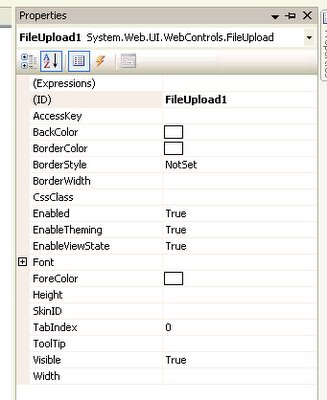
The actual work is done by some simple lines of C# code, it assumes that there is an uploads folder with the correct permissions to write files into!
String savePath = Request.PhysicalApplicationPath;
savePath += "uploads\";
if(FileUpload1.HasFile()){
--savePath += FileUpload1.FileName;
--FileUpload1.SaveAs(savePath);
}
Please note that SaveAs will cause an existing file with the same name to be overwritten.
Programatially we can limit the size of an upload by doing the following:
if(FileUpload1.PostedFile.ContentLength <= 3145728){
---- //save file
} else {
---- //cancel upload as its greater than 3mb
}
<asp:fileupload id="FileUpload1" runat="server"></asp:fileupload>
The new control exists under the standard tab

Dragging this form appears as follows on the form designer

The properties of this new control is listed below

The actual work is done by some simple lines of C# code, it assumes that there is an uploads folder with the correct permissions to write files into!
String savePath = Request.PhysicalApplicationPath;
savePath += "uploads\";
if(FileUpload1.HasFile()){
--savePath += FileUpload1.FileName;
--FileUpload1.SaveAs(savePath);
}
Please note that SaveAs will cause an existing file with the same name to be overwritten.
Programatially we can limit the size of an upload by doing the following:
if(FileUpload1.PostedFile.ContentLength <= 3145728){
---- //save file
} else {
---- //cancel upload as its greater than 3mb
}
Client scripts on a page
Ever need to put an alert onto a webpage from the codebehind? It wasn't logical doing it within ASP.NET1.x but now it seems better.
eg. on the page load
String script = "alert('testing this functionality');";
Page.ClientScript.RegisterClientScriptBlock(Me.GetType, "MyKey", script, True);
The RegisterClientScriptBlock() method has changed namespaces between 1.x and 2.0. It is now under the ClientScriptManager class (you can get access to this using Page.ClientScript)
The last parameter of this method is the "AddScript" parameter. It indicates whether the script should be enclosed within a <script> block. If this is set to false it will effectively be written to the page and not executed (it will appear as text on the rendered page)
The "key" parameter in 1.0 was allowed to be epty(but not null) now in 2.0 if it is empty it will generate a runtime error.
If you have a javascript include with your script (without the script tags) then use the Page.ClientScript.RegisterClientScriptInclude method it will generate code as follows:
<script src="./includedfile.js" type="text/javascript" ></script>
eg. on the page load
String script = "alert('testing this functionality');";
Page.ClientScript.RegisterClientScriptBlock(Me.GetType, "MyKey", script, True);
The RegisterClientScriptBlock() method has changed namespaces between 1.x and 2.0. It is now under the ClientScriptManager class (you can get access to this using Page.ClientScript)
The last parameter of this method is the "AddScript" parameter. It indicates whether the script should be enclosed within a <script> block. If this is set to false it will effectively be written to the page and not executed (it will appear as text on the rendered page)
The "key" parameter in 1.0 was allowed to be epty(but not null) now in 2.0 if it is empty it will generate a runtime error.
If you have a javascript include with your script (without the script tags) then use the Page.ClientScript.RegisterClientScriptInclude method it will generate code as follows:
<script src="./includedfile.js" type="text/javascript" ></script>
Validation groups on a page
In ASP.NET1.x controls on a single page are validated together! If you had 2 buttons on a page that were technically not related, example is a page that has a "microsoft search" button and a "save cart" button, then if there was a RequiredFieldValidator on a textbox related to the "save cart" button clicking "google search" will also be invalidated as both buttons are part of the same invalidation group.
ASP.NET2.0 allows controls in a page to be grouped logically so that postback in one group is not dependent on another!
Each button will now have a new attribute called ValidationGroup
The RequireFieldValidator will also have this attribute which signifies what group it belongs to!
A new feature of the RequireFieldValidator is the SetFocusOnError attribute. It will set the focus of the page to the ControlToValidate when the error occurs!
asp:requiredfieldvalidator id="RequiredFieldValidator1" errormessage="Required Field Validator Error" ControlToValidate="txtAge" ValidationGroup="groupOfControls" SetFocusOnError="True"
ASP.NET2.0 allows controls in a page to be grouped logically so that postback in one group is not dependent on another!
Each button will now have a new attribute called ValidationGroup
The RequireFieldValidator will also have this attribute which signifies what group it belongs to!
A new feature of the RequireFieldValidator is the SetFocusOnError attribute. It will set the focus of the page to the ControlToValidate when the error occurs!
asp:requiredfieldvalidator id="RequiredFieldValidator1" errormessage="Required Field Validator Error" ControlToValidate="txtAge" ValidationGroup="groupOfControls" SetFocusOnError="True"
Focus of controls
In asp.net 2.0 you can now set the focus of a control using its Focus() method. The Focus() method works on the server side, therefore be careful as postbacks will occur!
----txtAge.Focus()
If you want client side focusing then the following link will help you out!
Setting the default button and default focus on a Web Form is also simple now
----<form id="form1" runat="server" defaultbutton="btnSubmit" defaultfocus="txtAge">
----txtAge.Focus()
If you want client side focusing then the following link will help you out!
Setting the default button and default focus on a Web Form is also simple now
----<form id="form1" runat="server" defaultbutton="btnSubmit" defaultfocus="txtAge">
Friday, October 20, 2006
Security Controls Introduction
ASP.NET 2.0 Security controls are an awesome way to kick start your application down a secure pathway. They do everything you want to out of the box, and the things it can't can easily be plugged in..
Out of the box they let you perform user logins, registrations, password changes amoungst many other things, and its as simple as dragging a control onto a form.
Behind the scenes is a set of powerful API's known as the membership api's
Over the next couple of blogs ill show you how to use these security controls to secure your site!
Out of the box they let you perform user logins, registrations, password changes amoungst many other things, and its as simple as dragging a control onto a form.
Behind the scenes is a set of powerful API's known as the membership api's
Over the next couple of blogs ill show you how to use these security controls to secure your site!
Thursday, October 19, 2006
Partial classes
The new Partial keyword was introduced in .NET2.0 for both VB2005 and C#.
In a nutshell , partial classes mean that your class definition can be split into multiple physical files. Logically, partial classes do not make any difference to the compiler. At compile time it simply groups all the various partial classes and treats them as a single entity.
An awesome benefit of partial classes is that they allow a clean separation of business logic and the user interface (code generated by the visual studio designer).
The UI code can be hidden from the developer who normally doesnt need to access it anyways.
Partial classes also make debugging easier because of the partitioned classes. This is great for large develoment teams.
--Partial Class Default_aspx
--End Class
In a nutshell , partial classes mean that your class definition can be split into multiple physical files. Logically, partial classes do not make any difference to the compiler. At compile time it simply groups all the various partial classes and treats them as a single entity.
An awesome benefit of partial classes is that they allow a clean separation of business logic and the user interface (code generated by the visual studio designer).
The UI code can be hidden from the developer who normally doesnt need to access it anyways.
Partial classes also make debugging easier because of the partitioned classes. This is great for large develoment teams.
--Partial Class Default_aspx
--End Class
Debugging in 2005
By default the web.config file is not added to the web project.
For debugging you need the web.config file. Its found in the "Visual Studio installed templates".
For debugging you need the web.config file. Its found in the "Visual Studio installed templates".
Using IIS with ASP.NET in 2005
You will need to install IIS before you install Visual Studio 2005.
XP by default does not install IIS, so you will need to use the "Add or Remove Programs" and add it yourself.
If you have installed Visual Studio 2005 allready fear not you can still get them working. You need to associate IIS with ASP.NET. You can do this by using aspnet_regiis utility (located in C:\Windows\Microsoft.NET\Framework\) with the -i option.
------- aspnet_regiis -i
XP by default does not install IIS, so you will need to use the "Add or Remove Programs" and add it yourself.
If you have installed Visual Studio 2005 allready fear not you can still get them working. You need to associate IIS with ASP.NET. You can do this by using aspnet_regiis utility (located in C:\Windows\Microsoft.NET\Framework\
------- aspnet_regiis -i
ASP.NET 2.0
Microsoft made some major improvements based on feedback from millions of people and the companies own experience.
One of the aims of the new version is to considerably reduce the amount of code you need to perform common web site tasks (by up to 70%).
There are alot of new features like cross page posting and client side scripts, as well as major improvements to the page framework and new services and api's.
One of the aims of the new version is to considerably reduce the amount of code you need to perform common web site tasks (by up to 70%).
There are alot of new features like cross page posting and client side scripts, as well as major improvements to the page framework and new services and api's.
Subscribe to:
Posts (Atom)